TimelyBills helps you track your investments that now includes cryptocurrencies as well so that you can manage your finances in one place.
Follow these simple steps to create and manage a crypto account:
1. Launch the TimelyBills app on your device
2. Navigate to Accounts screen from the Home screen
3. Under the Investment category, select Crypto
4. Follow the setup steps: Info → Add Coins → Review
- Info: Enter details such as Account name, Platform, Platform Type, and Currency
- Add Coins: Tap on Add Coins button to select type of Crypto currency and followed by adding Quantity and Value purchased from the platform
- Review: Carefully check all the information entered in the Info and Add Coins
5. Tap the Create button to finish setting up your crypto account
6. You will be redirected to the Accounts screen, where your Crypto account will appear in the Investment category section
How to add/update more coins in your crypto account?
1. Launch the TimelyBills app on your device
2. Navigate to Accounts screen from the Home screen
3. Select Crypto account from account list under the Investment category
4. Tap on Plus (+) icon button
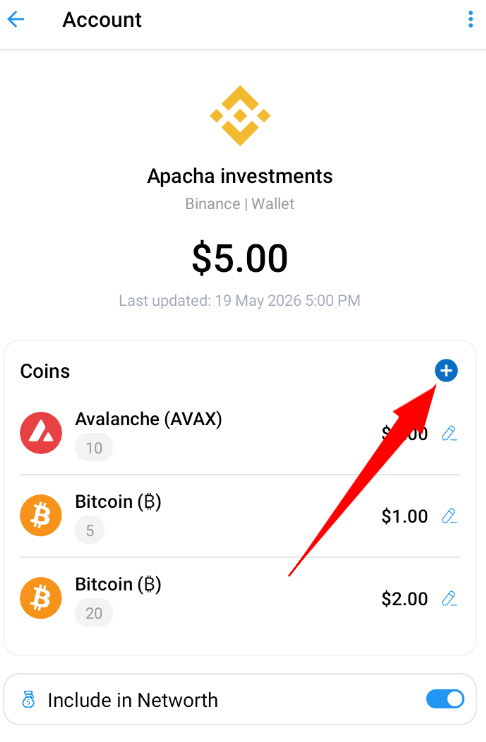
5. Select Coin from the coins list
6. Add Quantity and Value of selected crypto coins
7. Click on the Save button
8. Crypto coins are now added and are visible on the selected crypto Account detail screen
| Crypto accounts can't be used while creating or editing any type of transactions. They are only used to manage your net worth according to your crypto investment. |
If you counter any problem or have a query, please contact support at support@timelybills.app