In the latest version, lending and borrowing accounts are no longer managed as separate account types. Instead, both are unified under a single Person Account making it easier to track all your money you give or receive from the same individual in one place.
A Person Account represents someone you deal with financially allows you to record:
1. Money you lent (they owe you)
2. Money you borrowed (you owe them)
This provides a clearer, consolidated view of balances with each person
Steps to create a Person Account:
1. Open the TimelyBills app
2. Navigate from Home screen to Accounts screen
3. Tap the Plus (+) icon on the top-right corner
4. Select Person Account (under the Loan category)
5. Enter the required details (e.g., name, photo, notes, etc.)
6. Tap Create to successfully create a Person Account that will now appear on the Account list screen
How to record lending or borrowing transactions?
1. Redirect to the Accounts screen from the Home screen.
2. Select Person Account in the account list screen under Loan category
- Tap Send Money button when you are lending money
- Tap Receive Money button when you are borrowing money
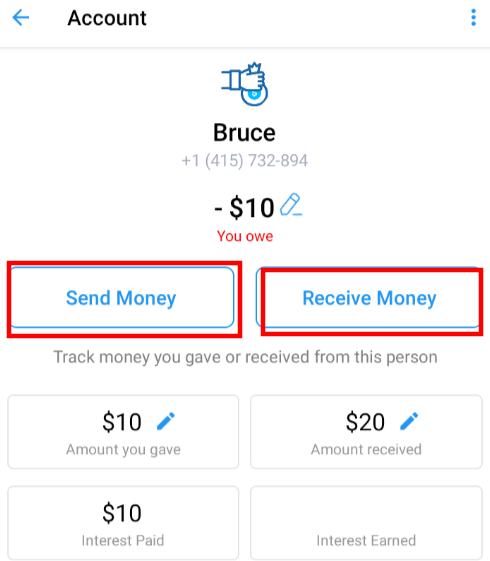
3. You will redirect to the transfer screen with from or to account selected as per your selection
4. Enter the Transfer Amount
- Select From Account when clicked on Send Money and select To Account when clicked on Receive Money
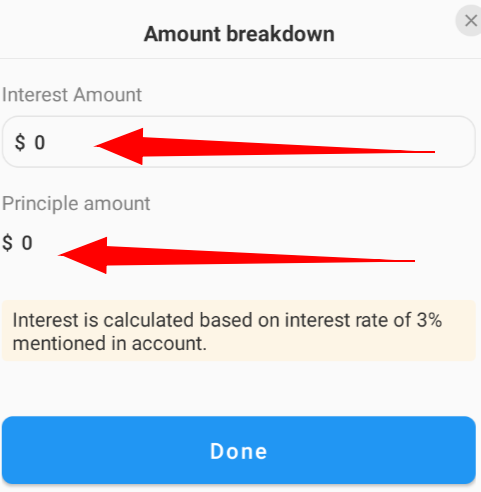
5. Tap on Breakdown to split the amount into (Optional)
- Interest Amount (enter 0 if not applicable)
- Principal Amount (actual amount apart from interest payment)
- Then tap Done button to save the Interest and Principal amount
6. Add additional details such as Purpose, Notes, Tags, etc.
7. Tap the Check mark icon (✔) at the top right corner to save the transaction.
8. Now you can view the transfer transaction on the Transactions screen or on the Recent Transactions card present in the Person Account detail screen
How are balances shown?
What changed from the previous version? Earlier:
Now:
|
If you counter any problem or have a query, please contact support at support@timelybills.app
Was this article helpful?
That’s Great!
Thank you for your feedback
Sorry! We couldn't be helpful
Thank you for your feedback
Feedback sent
We appreciate your effort and will try to fix the article